Publish CHAI™ Application Blueprint to EKS Cluster
Fetch CHAI™ Application Blueprint Details
We have a set of instructions in this PDF where you can create and deploy a sample nginx application in a Kubernetes cluster using CHAI™.
Step 1: Access CHAI™ GUI
-
Login to CHAI™ GUI at https://app.cloudhedge.io/ or "CHAI™-appliance-url".
-
Navigate to Cruize → Application Blueprints.
Step 2: Review Sample Application
We have created a sample application blueprint called 'eshop'. This application blueprint has 2 blueprint versions: 'v0' and 'v1'. Each blueprint version has a different application container image tag.
Publish Application Blueprint of Version 'v0' to Dev Environment
Execute the following command to publish the application blueprint to the gitops dev environment:
# Deploy application blueprint
Syntax: chctl cruize deploy --eks "<EKS_blueprint_name>" --appBlueprintName "<App_name_from_portal>" --appBlueprintVersion "<app_version>"

Example: chctl cruize deploy --eks "od-eks-dev-01" --appBlueprintName "eshop" --appBlueprintVersion "v0"
Check Deployed Applications
# Get deployed applications
Syntax: chctl cruize getDeployedApps --eks <EKS_blueprint_name>

Example: chctl cruize getDeployedApps --eks od-eks-dev-01
The above command will publish eshop application artifacts to the git repository monitored by ArgoCD in the EKS cluster "od-eks-dev-01". This ArgoCD will deploy this application to the "od-eks-dev-01" EKS cluster.
You can check the status of the deployment by navigating to the ArgoCD UI: https://localhost:8443
View Application in ArgoCD
Step 1: View Application Deployment
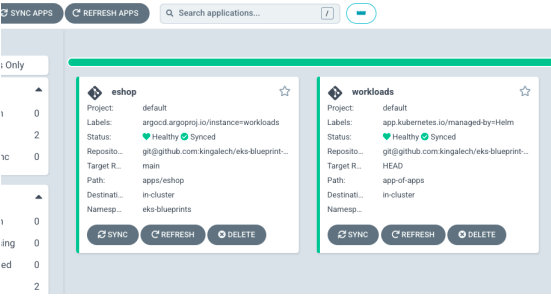
You will see that ArgoCD creates a new application with the name 'eshop' and will deploy the application on the cluster.
Step 2: View Service Details
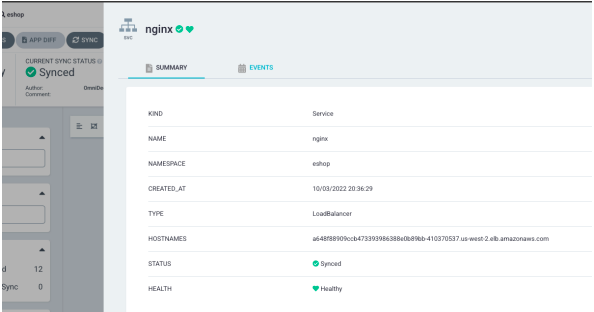
Navigate inside the application through ArgoCD and view details of the web-host (nginx) service. You will find the load balancer address of the nginx service, which is the frontend for the application.
Step 3: Access Application
Open the load balancer address in your browser and check the application.

Fetch Deployed Application Details
Execute the following command to get the deployed application blueprint: