Transform Concepts
What is Transform
Transform feature builds the docker container image out of all the artifacts collected during the discover phase like process binaries, process dependencies, process ports ( referred to as process information ). - CHAI™ application uses an agentless method for the said transform.
Build Box
Host is a physical or virtual machine which runs the docker daemon which builds the docker container image from process information. Following Build Box OSes are supported. ( Follow the full support matrix here.)
- Linux
- Windows
Transform Phases
Transform Process is divided into 2 phases.
- Phase 1 - Builds the docker container out of process information.
- Phase 2 - Uploads the docker container on public/private docker registry.
Phase 2 is optional.
Prerequisites
The build box requires the prerequisites to be satisfied before starting the transform. This is a mandatory step without which the transform will not start.
- Linux prerequisites
- Windows prerequisites
Base Image
This is base Docker container image ( Typically available on dockerhub or custom built ) used to include the process information to create the final application container.
The base image can be found in the Dockerfile section on CHAI™ UI as below:
-
Go to Projects -> Desired project -> Transform -> Components -> Click on 'containerize' button respected to the component
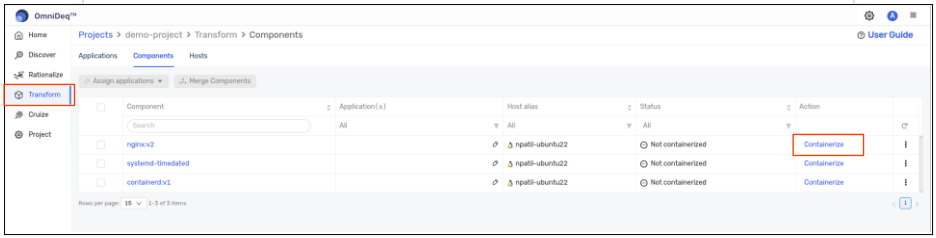
-
Select the profile you want to containerize -> In 'DockerFile' section, you will find the base docker image starting from 'FROM'
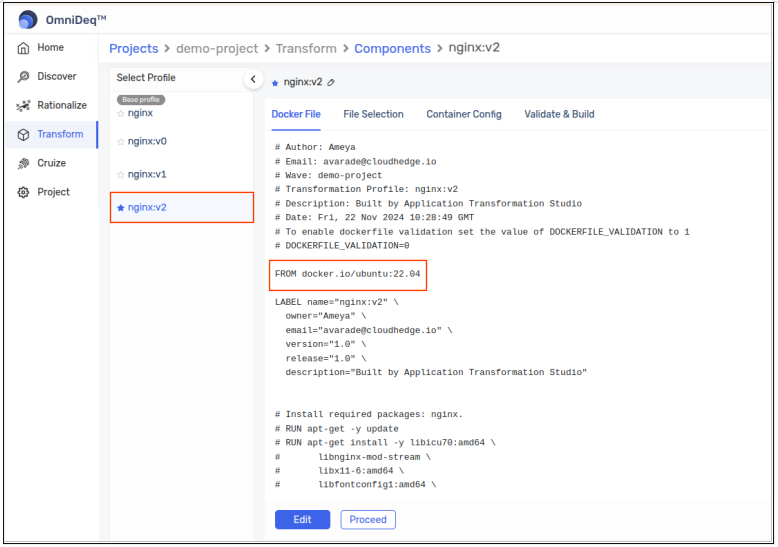
This base image needs to be present on the buildbox(Linux/Windows) for Transformation of the component.
There might be a situation where buildbox(Linux/Windows) might not have access to internet which will create hurdle for Transform phase. So we can resolve this and update the base image by using steps as below: